1、网上有一些介绍,但是很多都是采用JNDI的方式,麻烦,而且tomcat和activemq要分别启动,理想的方式是启动tomcat的同时启动activemq,在web工程中直接使用activemq 1,新建web工程,并导入基本jar包
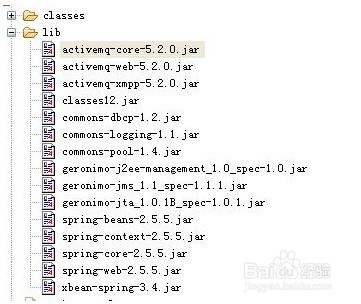
2、2,修改web.xml
Xml代码
<context-param>
<param-name>brokerURI</param-name>
<param-value>/WEB-INF/activemq.xml</param-value>
</context-param>
<listener>
<listener-class>org.apache.activemq.web.SpringBrokerContextListener</listener-class>
</listener>
3、3,增加WEB-INF/activemq.xml
Xml代码
<beans
xmlns="http://www.springframework.org/schema/beans"
xmlns:amq="http://activemq.apache.org/schema/core"
xmlns:xsi="http://www.w3.org/2001/XMLSchema-instance"
xsi:schemaLocation="http://www.springframework.org/schema/beans http://www.springframework.org/schema/beans/spring-beans-2.0.xsd
http://activemq.apache.org/schema/core http://activemq.apache.org/schema/core/activemq-core-5.2.0.xsd
http://activemq.apache.org/camel/schema/spring http://activemq.apache.org/camel/schema/spring/camel-spring.xsd">
<!-- The Oracle Datasource that will be used by the Broker -->
<bean id="oracle-ds" class="org.apache.commons.dbcp.BasicDataSource" destroy-method="close">
<property name="driverClassName" value="oracle.jdbc.driver.OracleDriver"/>
<property name="url" value="jdbc:oracle:thin:@localhost:1521:orcl"/>
<property name="username" value="activemq"/>
<property name="password" value="neusoft"/>
<property name="maxActive" value="200"/>
<property name="poolPreparedStatements" value="true"/>
</bean>
<!-- ==================================================================== -->
<!-- ActiveMQ Broker Configuration -->
<!-- ==================================================================== -->
<broker xmlns="http://activemq.apache.org/schema/core" brokerName="localhost">
<!-- The store and forward broker networks ActiveMQ will listen to -->
<networkConnectors>
<!-- by default just auto discover the other brokers -->
<networkConnector name="default-nc" uri="multicast://default"/>
<!-- Example of a static configuration:
<networkConnector name="host1 and host2" uri="static://(tcp://host1:61616,tcp://host2:61616)"/>
-->
</networkConnectors>
<!--
to enable Stomp support uncomment this <connector> <serverTransport
uri="stomp://localhost:61626"/> </connector>
-->
<persistenceAdapter>
<jdbcPersistenceAdapter dataSource="#oracle-ds"/>
<journaledJDBC useDatabaseLock="false"></journaledJDBC>
</persistenceAdapter>
<transportConnectors>
<transportConnector name="openwire" uri="tcp://localhost:61616" discoveryUri="multicast://default"/>
<transportConnector name="xmpp" uri="xmpp://localhost:61222"/>
</transportConnectors>
</broker>
</beans>
OK,将web工程添加进tomcat,启动tomcat,大功告成。
4、注意事项: 1,导入的基本jar包,只保证能够提供activemq的基本服务。 2,使用数据库来存储activemq的message,也可以不使用。 3,本文使用数据库为oracle,其他数据库的配置请参照下载zip的activemq.xml 4,如此配置activemq,启动的时候必须连接网线,否则会报错。 5,activemq.xml中的<journaledJDBC useDatabaseLock="false"></journaledJDBC>是保证更换数据库的时候activemq依然能够顺利启动
[悦创分享]