1、在线支付年费流程图如下:
点击左上角“MY ACCA”

2、在登录界面,User ID处输入ACCA学员号码、Password处输入密码,点击login登录。

3、登录后界面:
点击左侧“ACCOUNT ADMINISTRATION”前的“+”号;后可看到”fees, payments and print receipts”,点击fees , payments
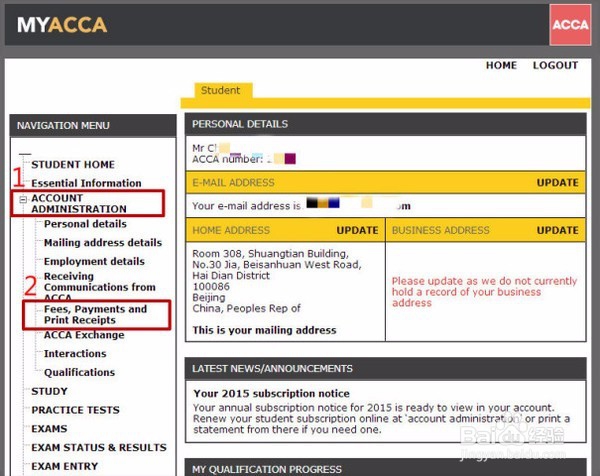
1、点击”Fees and Payments”后:

2、先勾选要付费的科目(第1步),后点击“Pay”(第2步):
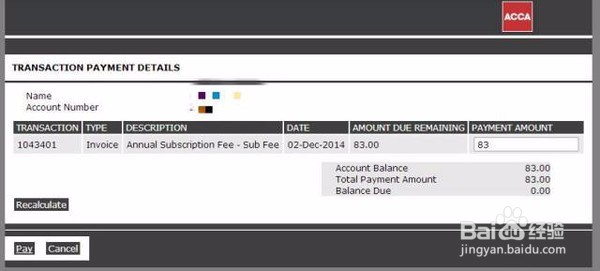
3、 确认付费金额,无误后点击左下角“Pay”:
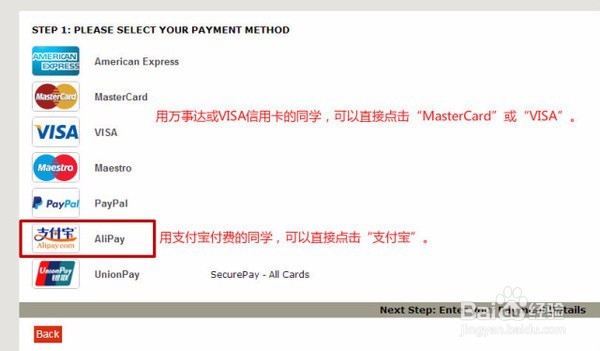
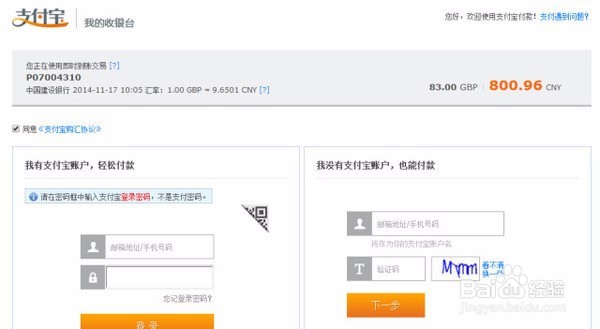
1、输入支付宝账号登录后即可付费。
手把手交给童鞋们,如果还不会的,你猜,会怎样?快去个人账户查看自己的年费是否产生吧?记得把这条消息保存哦!